
Intro #
I want to share what I found out regarding monitoring Huawei SUN2000 inverter using a Modbus/TCP method during my half-year journey with this inverter.
Let’s start with some basics first:
The inverter has internal WiFi access point built-in on its mother board. The main purpose for this is surely the initial configuration by an installer.
My inverter also comes with a bundled USB dongle called SDongleA-05 / WLAN-FE:
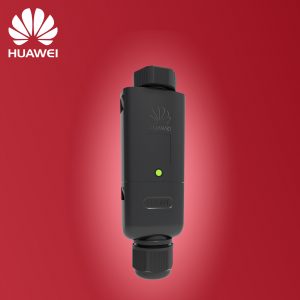
Main purpose of this dongle is to connect to Huawei’s FusionSolar cloud service and feed the data using internet connection. It is handling an ethernet cable connection or a WiFi to your home router.
Monitoring the device #
The FusionSolar cloud service is not bad, but I was hoping to connect to the device itself to be able to collect live parameters and plot it on Grafana (even when FusionSolar is offline).
Hopefully the inverter has the ability to expose the data using a Modbus protocol. There are three choices I am aware of:
- Dedicated RS-485 connection from the inverter
- Internal WiFi
- USB dongle (WiFi/Ethernet)
I have the ethernet cable routed to my inverter mounting place so a natural way of connecting it was using a dongle. Initially the dongle was not exposing the Modbus/TCP port, I had to upgrade a firmware. After the upgrade the 502 TCP port was open for communication (note: you need to explicitly enable this port on newest inverter/dongle firmware combinations).
Finally I was able to monitor my device using this #3 method.
Problems #
More I was using the dongle, the more I was annoyed about the quality of the measurements. First of all reading a complete set of parameters took even roughly 20 seconds!
Mainly the reading was errorless, but overall when looking at a whole day, I noticed some significant error rate, especially in the early morning. Looking at the logs the following was not unusual picture:
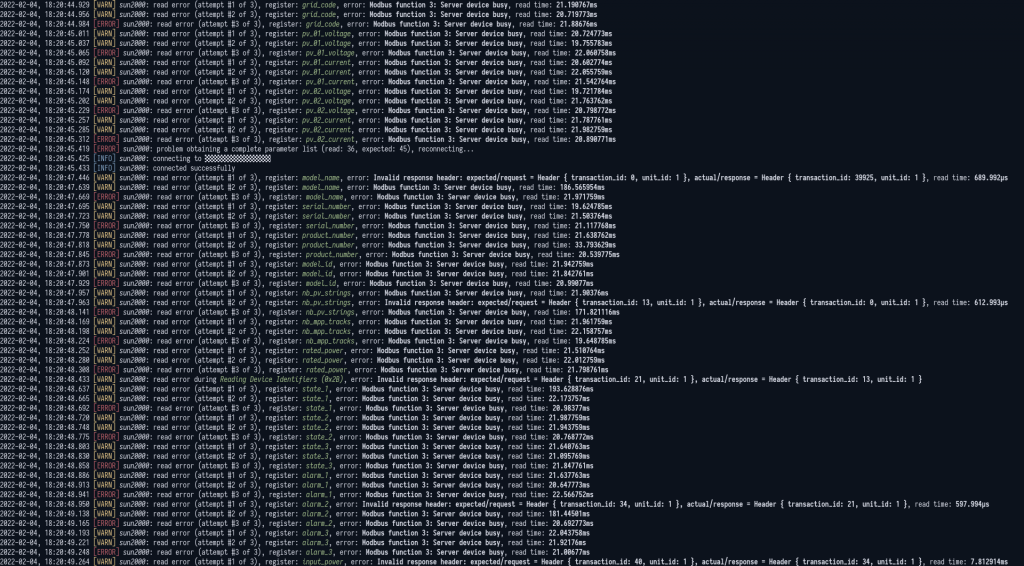
Overall, I was not happy with all this. I was even thinking that maybe the inverter itself is the one to blame (doing some daily tasks).
Additionally when there was a upgrade time of a FusionSolar infrastructure and a downtime for the service, the dongle has even more problems:
I think it is configured that when there is no connection it is automatically rebooting itself in some specified time-intervals (probably to recover connection). I don’t need to say that every such a reboot is a gap in data collection :(
After some longer period testing new inverter and dongle firmware versions and waiting for Huawei to eventually fix this… I finally get tired of looking at the errors and returned to the roots: using a #2 method: connecting using internal WiFi (note: the inverter is currently using a new port 6607 instead of 502).
Results #
Despite the additional hardware (access point) near the inverter I am really impressed for new connection method comparing the old one. First of all the complete set of parameters are read in roughly 5 seconds instead of 20!
I think that the following graph is self-explanatory:
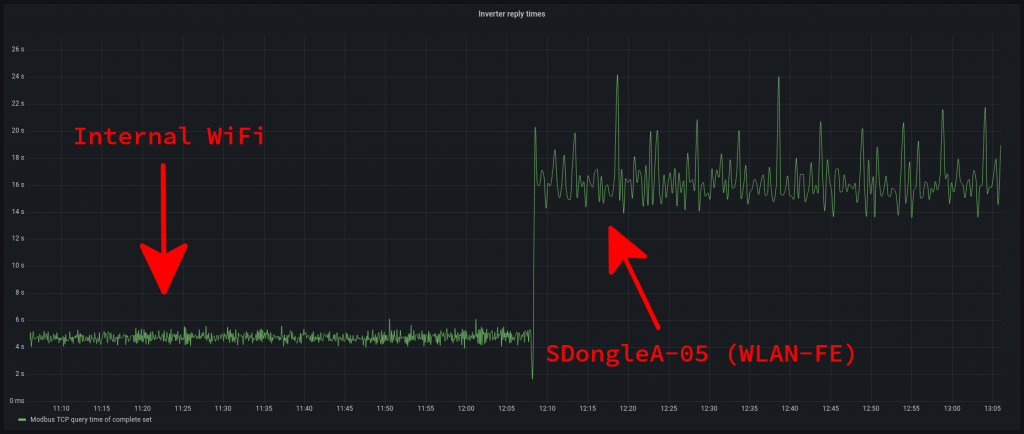
Moreover - my error log is totally clear!!! I have no lags/retries when reading the inverter data during whole day.
Conclusion #
If you have a choice and want fast, stable and reliable TCP Modbus connection to the inverter use method #2 (internal WiFi).
As the RS-485 (method #1) is the industry standard, I believe it is also fast and reliable (but I don’t have a chance to test it myself yet).
If you are OK with the timings and don’t want to mess with additional WiFi client configuration - use an USB Dongle, but keep in mind that it is not the best, fast and reliable Modbus connection available. I think this is because the Dongle was designed with FusionSolar in mind and the Modbus is just an added feature (sadly with Huawei’s low priority).