
Description and genesis #
ethlcd is a electronic project inspired by Guido Socher’s LCD display with ethernet interface, but let’s start from the beggining:
A very log time ago i’ve bought a HD44780 display. It was connected to my linux box and running LCDproc. The connection was a LPT printer port. The cable to computer was about 1.5m long. I was using a ribbon cable to my printer port and i’ve got +5V power supply from molex inside my PC. That hardware works good but have a several disadvantages - first of all - the annoying thing to me was that connection to printer port - i don’t like this type of connection. If i need to move my LCD somewhere else out of my desk i was strict limited to cable length. Besides, the long wire sometimes cause a strange behaviour on my display - i had to restart LCDproc to things come to normal.
I was thinking about different type of connection and i realised that ethernet connection will be great. I’ve started to google some opensource electronic project which connects the LCD display via ethernet - and i’ve found the Guido’s tuxgraphics page. That was it!!! :) The project is based on Atmel’s AVR atmega microprocessor family - which i very like because i had some experience with it. With the project was bundled sources (for avr-gcc compiler) so it was very nice - because i was able to customize the firmware to communicate with LCDproc and write an additional driver. The additional features in comparision to Guido’s project was: a PoE (Power over Ethernet), menu buttons, backlight and a beeper :). Due to simplify the PoE is not 802.3af compilant - it is home-made power supply.
Here you can find the photos from making the board, and the results
Features #
- ethernet connection using ENC28J60 ethernet controller
- Power over Ethernet (data and power using single UTP cable)
- Atmel’s ATmega168 microcontroller
- 6 buttons (MENU, UP, DOWN, LEFT, RIGHT, ENTER)
- backlight control in three states: ON, Night-Mode (partialy ON) and OFF
- beeper
- device act as a TCP server - LCDproc driver is connecting to device just by creating a TCP socket - no need to PC-side additional hardware besides NIC
The hardware #
I was trying to publish all resources related with this project opensource. Unfortunately the project wiring and PCB are in Altium Designer 6 format. If someone converted it to Eagle for example - please contact me - and i will add additional files. The wiring shown below is available in following formats:
- ethlcd_sch.pdf, 320 KB
- ethlcd.SchDoc (Schematic for Altium Designer 6), 230 KB
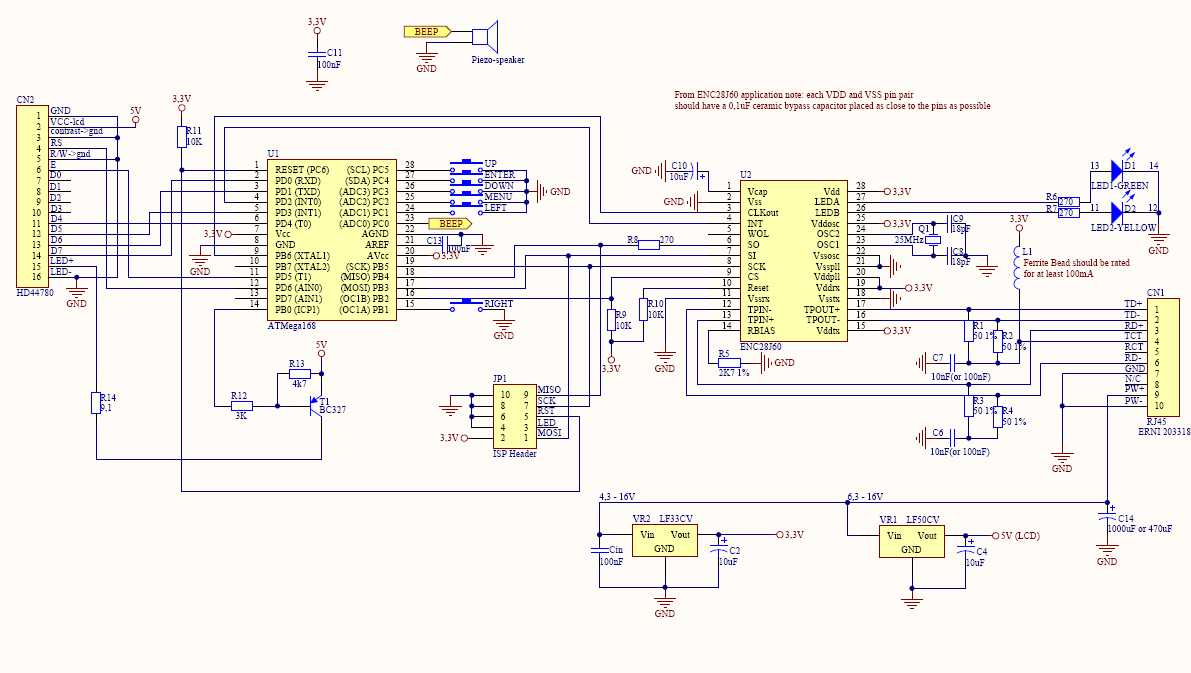
The description and step-by-step building instruction is available on Guido’s page - please read his article - you can treat the ethlcd project as a fork of Guido’s project - now i am only going to describe the differences:
The backlight: It is possible to have the backlight in three states: ON, partialy on (i called it night-mode) and OFF. When the T1 transistor is not driven, ie Atmel PB1 pin is set as input - the transistor is off and the backlight is switched off, when setting the PIN as OUTPUT - we can drive the transistor to ON and partialy ON depending on logic 0 or 1 on PB1 pin output.
Due to PoE i can’t use the integrated ethernet 08B0-1X1T-06-F from MagJack. The product i find from MagJack which is compatible with PoE and ENC28J60 is 0813-1X1T-57-F - it has a pins for PoE. Unfortunatelly - despite my efforts i cannot obtain this part in Poland. So i use a compatible ERNI part - 203318.
You can also download my PCB if you wish to:
- ethlcd.PcbDoc (PCB for Altium Designer 6), 190 KB
- ethlcd_pcb_big.pdf (big size, all layers), 159 KB
- ethlcd_pcb.pdf (not resized, needed layers only), 23 KB
Parts specifications #
- 203317.pdf (ERNI 203318, 203319, 203320, 203321, 203322 - not available on ERNI official pages), 43 KB
- LFxx_2574.pdf, 654 KB
- enc28j60.pdf, 1.6 MB
- enc28j60_errata.pdf, 192 KB
The firmware #
As you can expect - the firmware is also based on Guido’s firmware. I’ve made a small changes to act as a server on different port, and support the simple ethlcd protocol to communicate with lcdproc. You also need to note that only test0.c was adapted for ethlcd hardware (i’ve changed the led to backlight and beep switching instead of LED - this test is good for avr testing) - i didn’t change and analised the rest of tests - but i think they should work with small changes or without changes at all.
The original firmware has also a web-interface for sending characters to LCD and switching relay - i modified it to switch backlight transistor instead of relay, sending lines to LCD is working - it is good for first-time testing purposes. So i leave this piece of code in firmware - maybe in the future there will be a IP address settings and storing in EEPROM, who knows :) But there is one think you need to know about it - if LCDproc is connected to device you should not run the web-interface - generaly it works but sometimes it can hang up the whole device (i think because of packet sinking from ethlcd driver), so use web-interface only when not running LCDproc and all should be fine :)
The firmware with sources is available here:
- ethlcd-0.1-20080813.tar.bz2, 138 KB
- diff against eth_lcd_tcp-2.8.tar.gz, 23 KB
- ethlcd-0.1-20080813.hex (compiled hex file), 17 KB
The protocol #
The protocol is relative simple - it is based on query-answer model - it has the following commands:
| Operation | Computer sends | Device response |
|---|---|---|
| Sending instruction(s) to LCD | <ETHLCD_SEND_INSTR> <Instr> where <Instr> := one or more bytes of instruction |
<ETHLCD_SEND_INSTR> |
| Sending data to LCD | <ETHLCD_SEND_DATA> <Data> where <Data> := one or more bytes of data |
<ETHLCD_SEND_DATA> |
| Getting current buttons state | <ETHLCD_GET_BUTTONS> |
<ETHLCD_GET_BUTTONS> <KeyState> where <KeyState> := one byte where bits are set to 1 for keys currently released and 0 for pressed keys |
| Setting the backlight | <ETHLCD_SET_BACKLIGHT> <TypeOfBacklight> where <TypeOfBacklight> := one byte: <ETHLCD_BACKLIGHT_ON> (full backlight), <ETHLCD_BACKLIGHT_HALF> (half backlight, night-mode) or <ETHLCD_BACKLIGHT_OFF> (backlight off) |
<ETHLCD_SET_BACKLIGHT> |
| Turn on/off the beeper | <ETHLCD_SET_BEEP> <BeepState> where <BeepState> is <0x00> (turn beep off) or <0x01> (turn beep on) |
<ETHLCD_SET_BEEP> |
| Getting firmware version | <ETHLCD_GET_FIRMWARE_VERSION> |
<FIRMWARE_VERSION> := string describing firmware version |
| Getting protocol version | <ETHLCD_GET_PROTOCOL_VERSION> |
<ETHLCD_GET_PROTOCOL_VERSION> <PROTOCOL_VERSION> where <PROTOCOL_VERSION> := one byte with protocol version |
| Getting ENC28J60 revision | <ETHLCD_GET_ENC_REVISION> |
<ETHLCD_GET_ENC_REVISION> <ENC_REVISION> where <ENC_REVISION> := one byte with ENC28J60 chip revision |
| Request for closing connection | <ETHLCD_CLOSE_CONN> |
<ETHLCD_CLOSE_CONN> and initiate the connection close |
| - | none of above | <ETHLCD_UNRECOGNIZED_COMMAND> - replied when the command sent to device was unrecognized |
| Constant name | hex code |
|---|---|
| ETHLCD_SEND_INSTR | 0x01 |
| ETHLCD_SEND_DATA | 0x02 |
| ETHLCD_GET_BUTTONS | 0x03 |
| ETHLCD_SET_BACKLIGHT | 0x04 |
| ETHLCD_SET_BEEP | 0x05 |
| ETHLCD_GET_FIRMWARE_VERSION | 0x06 |
| ETHLCD_GET_PROTOCOL_VERSION | 0x07 |
| ETHLCD_GET_ENC_REVISION | 0x08 |
| ETHLCD_CLOSE_CONN | 0x09 |
| ETHLCD_UNRECOGNIZED_COMMAND | 0x0A |
| Backlight states | hex code |
| ETHLCD_BACKLIGHT_ON | 0x01 |
| ETHLCD_BACKLIGHT_HALF | 0x02 |
| ETHLCD_BACKLIGHT_OFF | 0x03 |
Protocol limitations/to-do’s:
It would be significant better when the ethlcd device send the key codes only when it changes to LCDproc driver - now it still polling the device for changes - I know this is not good - but due to lack of time i don’t did it in proper way. If someone does - please contact me.
LCDproc driver #
The ethlcd support is currently available in LCDproc development tree via CVS.
Update: ethlcd is available since lcdproc-0.5.3 release.
Links #
- An LCD display with ethernet interface
- An LCD display with ethernet interface (related download files)
- Twatch networked LCD
Contact #
Feel free to mail me if you have any information/suggestions/broken links:
e-mail/jabber: manio@skyboo.net